Text expander for Windows

Turn a short keyword into the complete phrase

Stop retyping greetings, support replies, signatures, dates, and other repetitive text. TextExp watches for your shortcuts and expands them into complete, reusable snippets as you type.

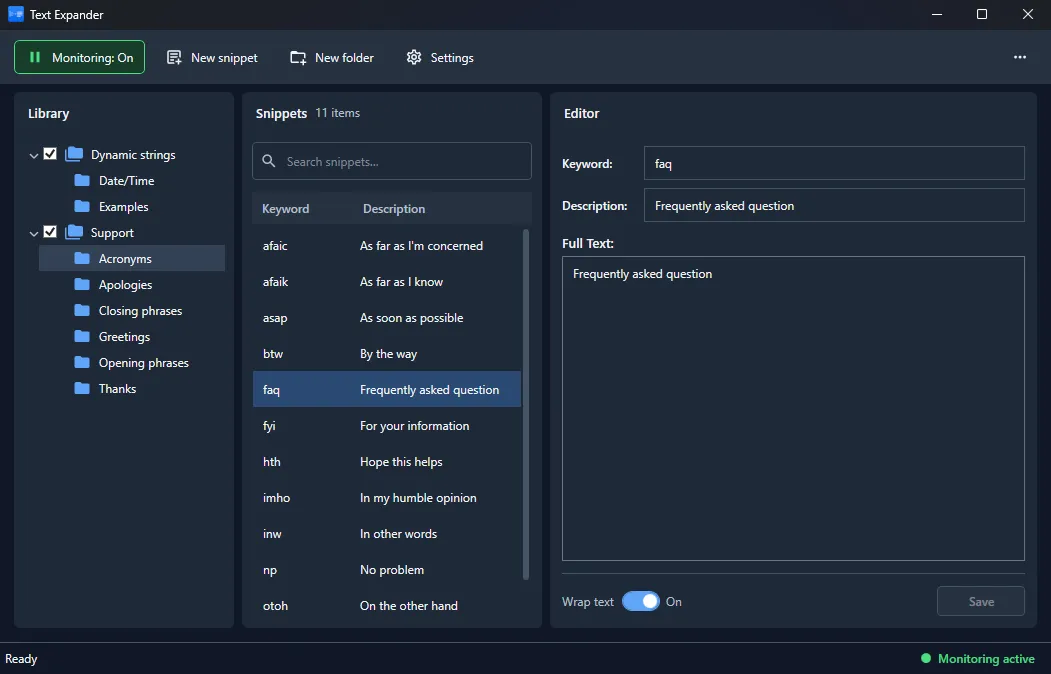
TextExp text expander for Windows showing an organized snippet library, keyword search, and text template editor

Your frequently used text, ready in a few keystrokes

TextExp combines quick text replacement with an organized snippet library, giving you a faster way to write recurring messages without sacrificing accuracy or consistency.

Type a keyword

Use a memorable shortcut instead of manually entering the same complete phrase again.

Expand instantly

TextExp replaces the shortcut while keyboard monitoring runs quietly in the background.

Stay consistent

Reuse approved wording for replies, greetings, apologies, signatures, and common instructions.

TextExp snippet editor with a text replacement keyword and reusable multi-line template
Text replacement shortcuts

Write repeated phrases without repeating the work

Create a keyword and connect it to any reusable block of text. With monitoring enabled, TextExp recognizes the shortcut and inserts the complete snippet, reducing manual typing in everyday communication.

  • Custom keywords for frequently used text
  • Multi-line snippets for complete replies and templates
  • Optional separator key before phrase insertion
  • Pause or resume monitoring at any time
Organized snippet library

Keep hundreds of shortcuts easy to find

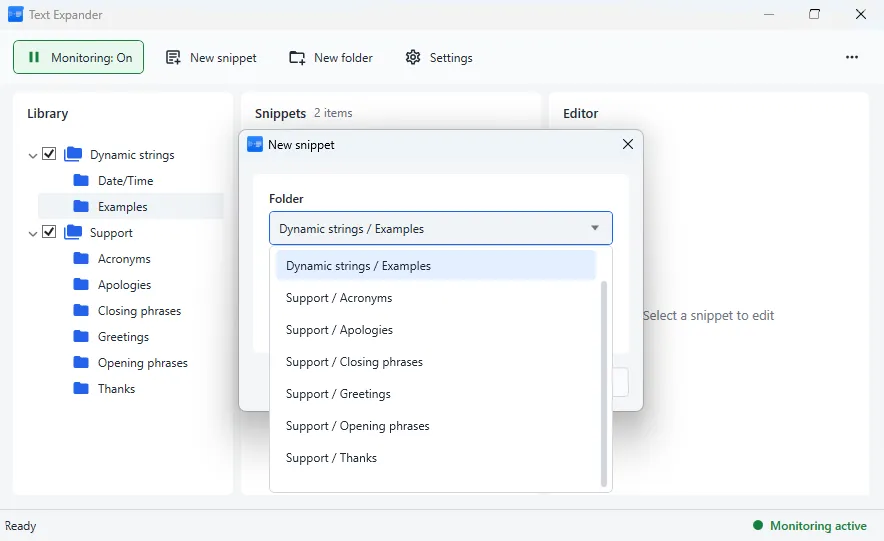
Group snippets into folders that match your workflow - from support and sales to personal messages and dynamic strings. Browse the library tree or search by keyword when you need to update a particular phrase.

  • Folders and nested categories
  • Fast snippet search
  • Keyword and description shown together
  • Enable only the libraries you currently need
Create a new TextExp snippet and choose an organized folder for support replies, greetings, apologies, or dynamic strings
Dynamic TextExp template using year, month, day, and GUID variables to generate current values
Dynamic text templates

Insert current values instead of static text

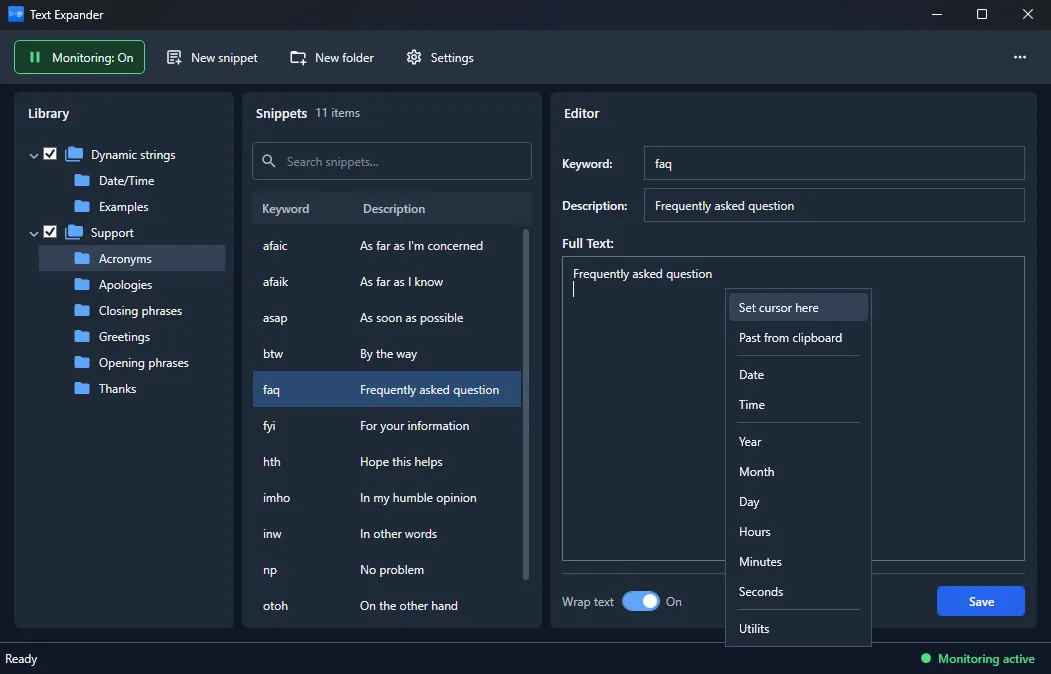
Build snippets with dynamic placeholders for values such as the current year, month, day, time, or a generated identifier. One shortcut can produce an up-to-date result every time it is expanded.

  • Current date and time components
  • Flexible date formats assembled from variables
  • Generated GUID values
  • Dynamic and static content in the same snippet
Background keyboard monitoring

Ready when you type, unobtrusive when you do not

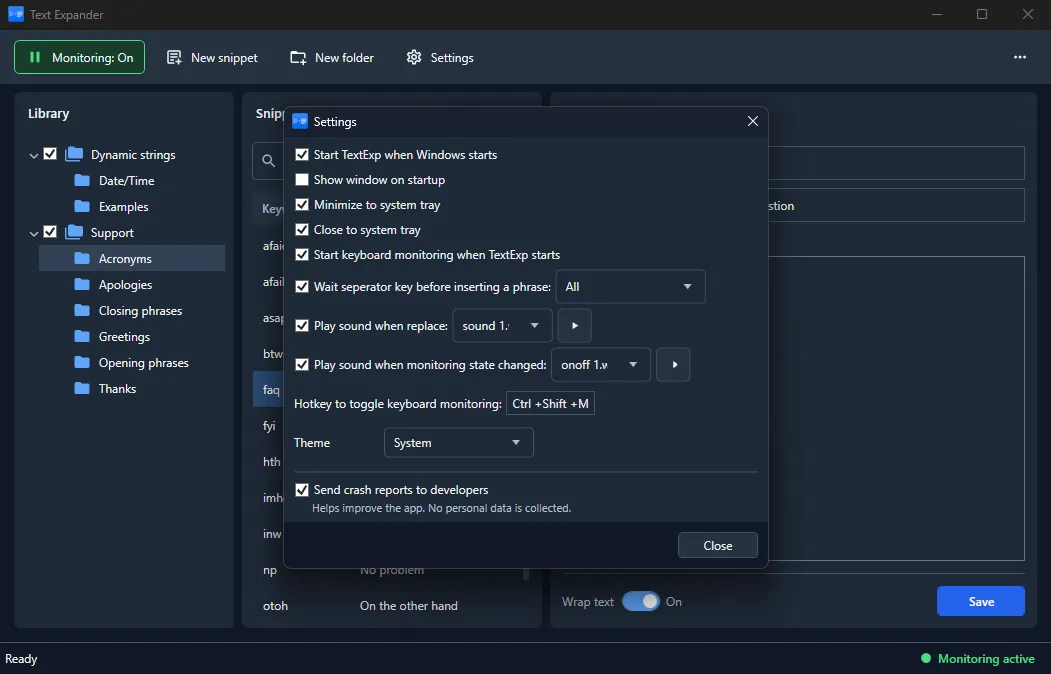
Run TextExp with Windows and minimize it to the system tray. A configurable hotkey lets you toggle monitoring quickly, while clear status indicators show whether text expansion is currently active.

  • Start automatically with Windows
  • Minimize and close to the system tray
  • Custom hotkey for monitoring control
  • Optional sounds for replacement and state changes
TextExp settings for Windows startup, system tray behavior, keyboard monitoring hotkey, themes, and notification sounds
TextExp text expansion preferences with monitoring startup, separator key, notification, and interface theme options
A workflow that fits your desktop

Control how and when text expansion happens

Choose whether monitoring starts automatically, decide which separator confirms a shortcut, and select the interface theme that matches your system. TextExp keeps essential behavior configurable without turning setup into a project of its own.

  • Automatic or manual monitoring startup
  • Configurable shortcut separator behavior
  • System-aware theme selection
  • Immediate visual monitoring status
Gallery

Interface Screenshots

Take a visual tour through the different panels and dashboards of TextExp.

TextExp text expander main window with snippet library, keyword editor, folders, and automatic text replacement for faster typing.
TextExp snippet editor with dynamic variables, date and time placeholders, clipboard insertion, and automatic text expansion.
TextExp settings window with startup options, system tray behavior, keyboard monitoring, hotkeys, themes, and application preferences.
Licensing

Choose Your Edition

Download the free evaluation trial or purchase a lifetime commercial license.

Evaluation Trial

Perfect for testing compatibility and evaluating features on your system.

Free
  • Standard product features enabled
  • 14-day fully functional trial period
  • Local file creation and analysis
  • Custom exports disabled
Download for Windows

One-Time Purchase

Full commercial license. One-time purchase, yours forever with free updates.

$24.95
  • Unlimited commercial usage rights
  • Unlock all export capabilities
  • Free lifetime minor & major updates
  • Priority email engineering support
Buy for Windows
Today's Special Offer

Boost Your Workflow: Get 20% Off Text Expander Pro Now!

Limited Time Offer
TextExp

TextExp

Text Expander Pro license now available at $19.95!

Click code to copy coupon
EXPAND_TEXT20 Copy Code
02
Days
18
Hours
45
Mins
00
Secs
Original Price: $24.95
Discount: -20%
New Price: $19.95
Buy Now

Latest Studio Updates

Keep up with product announcements, new features, and development logs from our team.

Retake Incorrect, Correct, or Skipped Questions in ProfExam Simulator 10.21.6
July 9, 2026 ProfExam

Retake Incorrect, Correct, or Skipped Questions in ProfExam Simulator 10.21.6

New in ProfExam Simulator 10.21: retake incorrect, correct, skipped, or all exam questions directly from the results screen for more effective certification exam preparation.

Read Article
ProfExam Creator 10.2.2.495: Import questions from JSON - a new dedicated window
May 29, 2026 ProfExam

ProfExam Creator 10.2.2.495: Import questions from JSON - a new dedicated window

Import from JSON is a new window in ProfExam Creator 10.2.2.495 that lets you load questions from a JSON file directly into your exams - with a built-in editor, live preview, and flexible import options

Read Article
ProfExam Simulator 10.20.5 - What's New
May 14, 2026 ProfExam

ProfExam Simulator 10.20.5 - What's New

A focused update packed with usability improvements - faster navigation, full keyboard control, flexible answer styles, and long-requested fixes for macOS and Linux users.

Read Article