Batch image resizer and icon generator

Every image size you need from a single source

Add one image, choose a size collection, and generate a complete set of icons or assets in a single run. No repetitive resizing and no manual export for every variation.

SizeForge batch image resizer with app icon size collection

One simple workflow instead of dozens of exports

SizeForge brings image selection, target dimensions, and batch file generation together in one compact workspace.

Drag, drop, and start

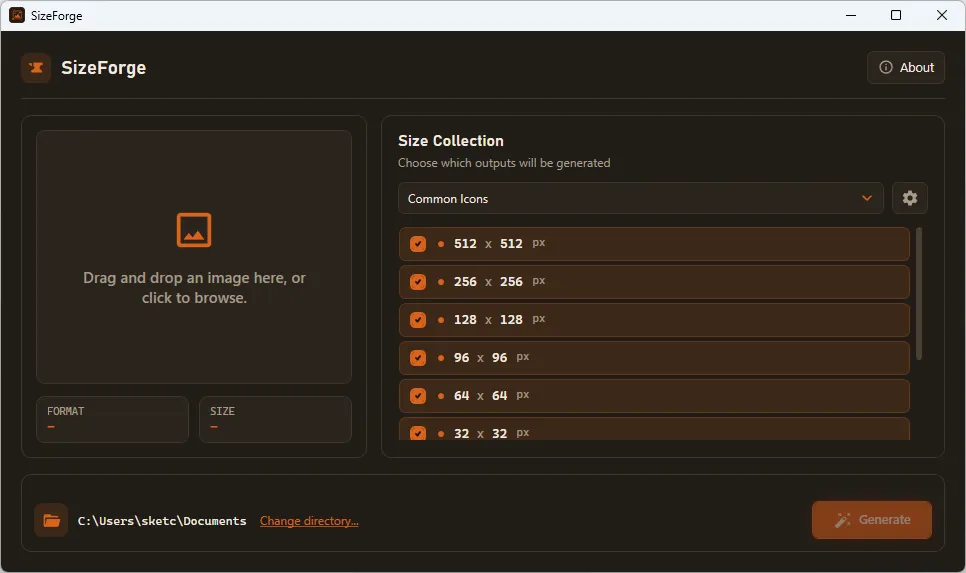
Drop an image into SizeForge or select a source file using the standard file browser.

Choose a size preset

Use a ready-made icon size collection or select a reusable custom preset.

Generate every size

Create all selected image variations at once and save them to your chosen output folder.

Select multiple output dimensions in the SizeForge batch image resizer
Batch image resizing

Stop repeating the same resize and export steps

Select every required dimension and generate the full set in one run. SizeForge keeps all output sizes visible, making it easier to prepare complete image and icon packages without missing a required variation.

  • Multiple image sizes from one source file
  • A clear preview of every output dimension
  • Enable or disable individual sizes
Ready-made icon size collections

Popular app icon dimensions are already organized

Switch between presets for common icons, Apple App Store assets, Microsoft Store icons, and Android. Choose the complete collection instead of looking up platform-specific image requirements for every release.

  • Common icon sizes for everyday projects
  • Apple App Store and Microsoft Store presets
  • A dedicated Android icon collection
Apple App Store, Microsoft Store, and Android icon size presets in SizeForge
Custom image size preset editor in SizeForge
Custom image size presets

Save the exact dimensions your projects require

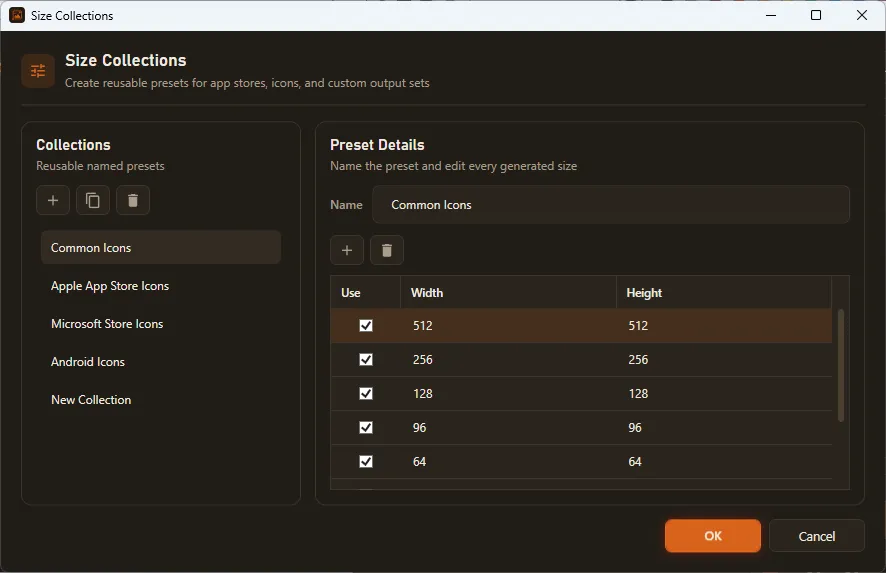
Create named collections, enter custom width and height values, and keep only the outputs you need. Reuse the same preset for your next project, app update, or recurring asset production task.

  • MultipleCustom width and height values
  • MultipleDuplicate and remove size collections
  • MultipleReusable settings for repeatable exports
Output control

Save generated images exactly where you need them

Choose the destination folder before generation and keep the output path visible. Send finished image assets directly to an application resources folder, build directory, or publishing workspace.

  • Choose a dedicated output directory
  • See the source format and dimensions at a glance
  • Generate the complete image set with one action
Choose an output folder and generate resized images with SizeForge
Gallery

Interface Screenshots

Take a visual tour through the different panels and dashboards of SizeForge.

Main SizeForge window for selecting an image, choosing output sizes, and generating resized images.
Size collection settings window with editable image size presets for app icons and custom image exports.
Licensing

Get SizeForge

Available now on the Microsoft Store.

SizeForge

Generate complete image size sets from a single source image

$0.95
  • Official release, kept up to date automatically
  • Managed installs and updates via Microsoft Store
  • Secure, verified distribution
Get from Microsoft Store

Latest Studio Updates

Keep up with product announcements, new features, and development logs from our team.

Retake Incorrect, Correct, or Skipped Questions in ProfExam Simulator 10.21.6
July 9, 2026 ProfExam

Retake Incorrect, Correct, or Skipped Questions in ProfExam Simulator 10.21.6

New in ProfExam Simulator 10.21: retake incorrect, correct, skipped, or all exam questions directly from the results screen for more effective certification exam preparation.

Read Article
ProfExam Creator 10.2.2.495: Import questions from JSON - a new dedicated window
May 29, 2026 ProfExam

ProfExam Creator 10.2.2.495: Import questions from JSON - a new dedicated window

Import from JSON is a new window in ProfExam Creator 10.2.2.495 that lets you load questions from a JSON file directly into your exams - with a built-in editor, live preview, and flexible import options

Read Article
ProfExam Simulator 10.20.5 - What's New
May 14, 2026 ProfExam

ProfExam Simulator 10.20.5 - What's New

A focused update packed with usability improvements - faster navigation, full keyboard control, flexible answer styles, and long-requested fixes for macOS and Linux users.

Read Article