Everyone has a few things they do over and over: packing for a trip, shipping a release, closing up the shop, getting the house ready for guests, walking a new hire through their first day. And everyone has the same two ways of dealing with them.
You keep the list in your head - and forget exactly one thing, every single time. Or you write it down once in a notes app, tick everything off, and then next time you are staring at a list where all the boxes are already checked. So you uncheck them one by one, or copy the note, or just start over. A month later you have "Trip packing", "Trip packing 2" and "Trip packing (new)", and no idea which one is the good one.
The problem is not the list. The problem is that the list you keep and the list you are working through are the same object.
That's why we built Checklist Tracker.
How It Works
- Write a template once: a title, a description, and the steps. Any step can carry a note with the details you always forget.
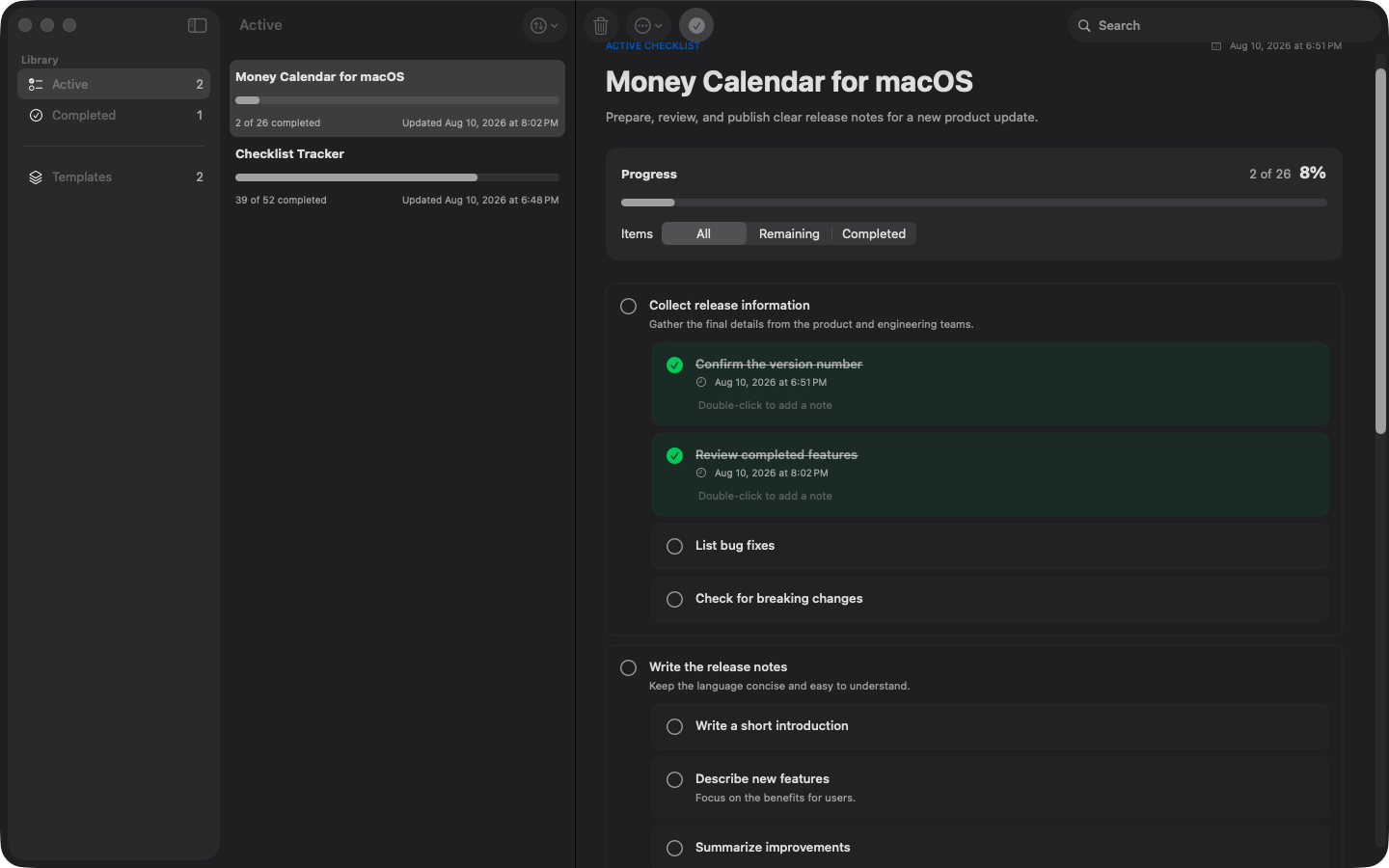
- Start a run when it's time to actually do the thing. The run is a complete, independent copy of the template at that moment.
- Tick items off in the run. The template stays clean - edit it later, or delete it entirely, and every run you already started keeps exactly what it had.
- Run the same template as many times as you like, and keep several runs going side by side. Two trips at once is not a problem.
Why You'll Love It
- Nesting that goes as deep as the work: any item can hold child items, and those can hold their own. "Pack the kitchen" quietly holds the fifteen things that actually need packing, so the list stays short until you need the detail.
- Honest progress: every run counts every single item, including the ones tucked inside others. Finish the last child and the parent ticks itself off. Hide what's done to see only what's left.
- Drag to reorganize: drop an item onto another to nest it, or pull it back out to promote it. Whatever you move brings its children along, and an item can never land inside itself.
- Runs you can come back to: start and finish dates are kept automatically, you can leave a completion note, reset a run to start it over, or reopen one you already closed.
- Off the screen when you need it: print through the standard macOS print panel, save as a PDF with selectable text, or copy it out as a Markdown task list that pastes straight into GitHub, Obsidian or Notion. Export to JSON to back up your library or move it to another Mac.
- Yours and only yours: a native SwiftUI app with no account, no sync service and no tracking. Everything lives on your Mac and works offline.
Pricing: One Purchase, No Subscription
Checklist Tracker costs $9.99 on the Mac App Store - a single, one-time purchase, all future updates included. No monthly fee for an app that keeps a list.
Version 1.1.5 requires macOS 14 or later and is available in English, German, Spanish, French, Turkish and Russian.
Mac App Store: Get Checklist Tracker on the Mac App Store
Learn more: Checklist Tracker product page