RSS and Atom feed reader for Windows

Bring the news you choose into one calm harbor

Follow websites without juggling tabs, algorithms, or crowded inboxes. FeedHarbor organizes your RSS and Atom subscriptions, highlights new posts, and lets you read complete articles in a focused desktop workspace.

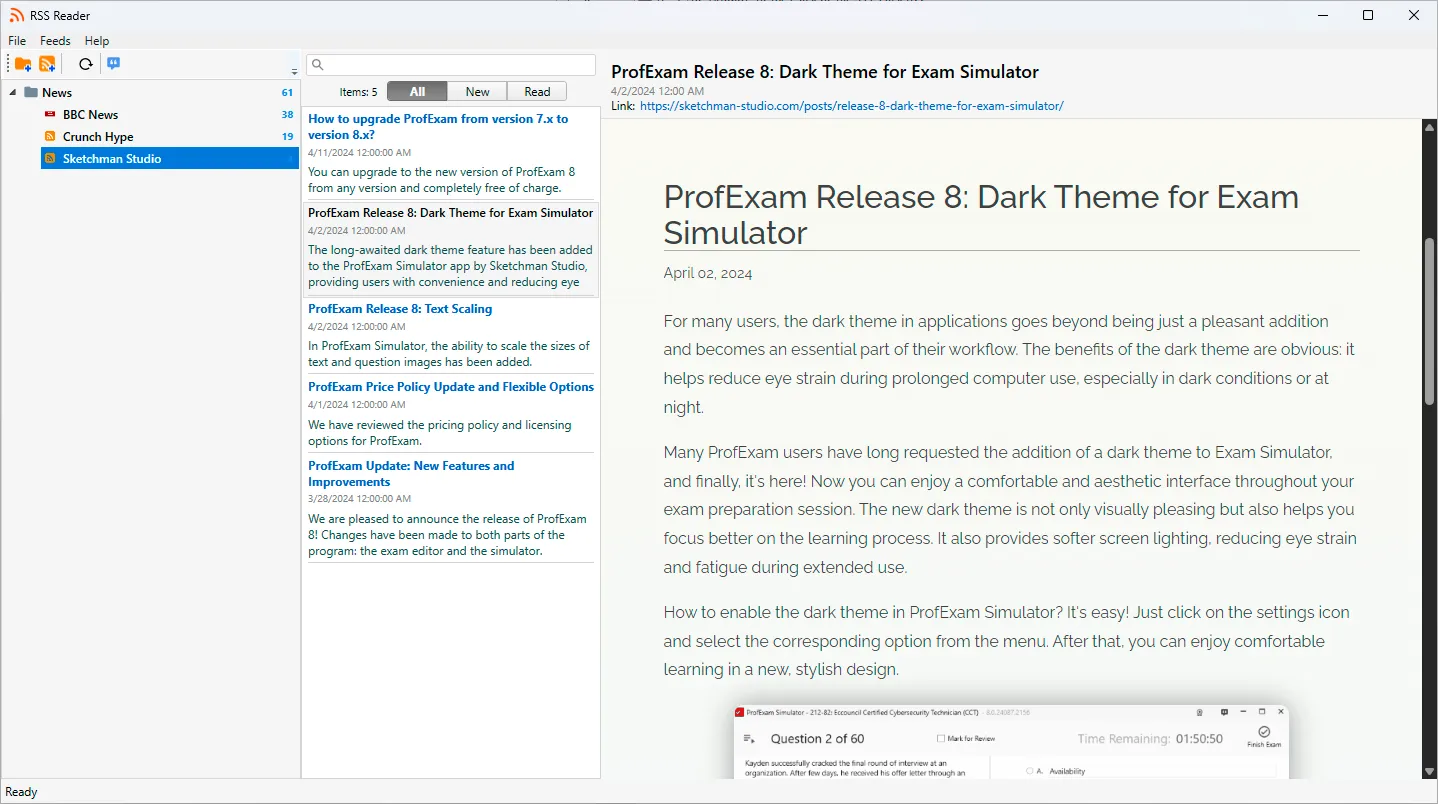
FeedHarbor RSS reader for Windows with feed folders, unread article counts, search and status filters, article list, and full content viewer

A straightforward way to follow websites and read what matters

FeedHarbor brings subscription management, unread tracking, search, favorites, and article reading into one familiar Windows application.

Subscribe directly

Add RSS and Atom feed addresses and receive new posts from the original publishers.

Organize your sources

Group subscriptions into folders and nested folders that reflect your interests and projects.

Read in one window

Move from feed to article list to complete content without losing your place.

Three-column reading workspace

See your sources, stories, and article together

The interface keeps navigation and reading context visible at the same time. Choose a folder or feed on the left, browse matching posts in the center, and read the selected article on the right. Drag the dividers to give each area the space it needs.

  • Resizable feed library, article list, and reader
  • Unread counts beside subscriptions
  • Article title, date, source link, and content
  • Status bar for current operations
Feeds and folders

Arrange subscriptions around your interests

Create nested folders, add feeds at the appropriate level, rename items, and drag subscriptions between folders. Update an individual feed, a complete folder, or the entire library when you want fresh results.

  • Nested folder structure
  • Drag-and-drop organization
  • Per-feed and all-feed refresh
  • Read and unread controls for groups
Search and filters

Move directly to the stories you need

Search the selected feed or folder by text, then narrow the article list by reading state. Dedicated views for all, new, read, and favorite posts keep large collections manageable.

  • Article text search
  • All, New, Read, and Favorites filters
  • Visible unread counts
  • Quick search clearing
Favorites and article actions

Keep useful posts within reach

Mark an article as a favorite from its header or shortcut menu. Copy a title, copy the original URL, or open the source page in your default browser whenever you need to reference or share it.

  • Favorite article collection
  • Copy article titles and links
  • Open the original page in a browser
  • Delete articles you no longer need
Automatic feed monitoring

Let new stories come to you

Set FeedHarbor to check subscriptions automatically at a chosen interval and show a Windows notification when new articles arrive. Start it with Windows and keep it in the system tray for a lightweight background workflow.

  • Configurable automatic refresh interval
  • Notifications for newly discovered posts
  • Optional Windows startup
  • Minimize or close to the system tray
Gallery

Interface Screenshots

Take a visual tour through the different panels and dashboards of FeedHarbor.

FeedHarbor - Free RSS Reader
Free Edition

Download Free Version

Completely free for personal and commercial usage. No licenses, sign-ups, or subscriptions required.

FeedHarbor

An application for managing and reading news feeds with offline access and search capabilities.

  • Unlimited personal and commercial usage rights
  • 100% features fully unlocked (no limits, no watermarks)
  • Free lifetime updates and security patches
  • Offline-first execution (data stays fully private on your drive)
Download for Windows

Latest Studio Updates

Keep up with product announcements, new features, and development logs from our team.

Retake Incorrect, Correct, or Skipped Questions in ProfExam Simulator 10.21.6
July 9, 2026 ProfExam

Retake Incorrect, Correct, or Skipped Questions in ProfExam Simulator 10.21.6

New in ProfExam Simulator 10.21: retake incorrect, correct, skipped, or all exam questions directly from the results screen for more effective certification exam preparation.

Read Article
ProfExam Creator 10.2.2.495: Import questions from JSON - a new dedicated window
May 29, 2026 ProfExam

ProfExam Creator 10.2.2.495: Import questions from JSON - a new dedicated window

Import from JSON is a new window in ProfExam Creator 10.2.2.495 that lets you load questions from a JSON file directly into your exams - with a built-in editor, live preview, and flexible import options

Read Article
ProfExam Simulator 10.20.5 - What's New
May 14, 2026 ProfExam

ProfExam Simulator 10.20.5 - What's New

A focused update packed with usability improvements - faster navigation, full keyboard control, flexible answer styles, and long-requested fixes for macOS and Linux users.

Read Article