Ask where someone keeps their passwords and you get one of three answers. In their head, which works right up until the day it doesn't. In a browser, together with the session that browser is already logged into. Or in a file called something like passwords.xlsx, which is honest about the problem and does nothing about it.
And none of those has anywhere sensible to put the things that are not passwords - the licence key for software you paid for, the bank details you need twice a year, a scan of a document, the recovery codes you were told to write down somewhere safe.
Secrets Guard 3.0 for Windows is out, and it is built for all of it.
The vault is a file, and you decide where it lives
Your data goes into a single encrypted vault file that you create yourself, in the folder you choose - on the machine, on an external drive, wherever you consider safe. One master password opens it; one click locks it again when you step away, and you can change that master password later from Settings.
What Secrets Guard does not have is a network connection. Not for sync, not for a web extension, not even to check for its own updates. There is no account, no cloud, and nothing to breach on someone else's server - the vault is only ever on the machines you put it on.
Records shaped like the thing you are storing
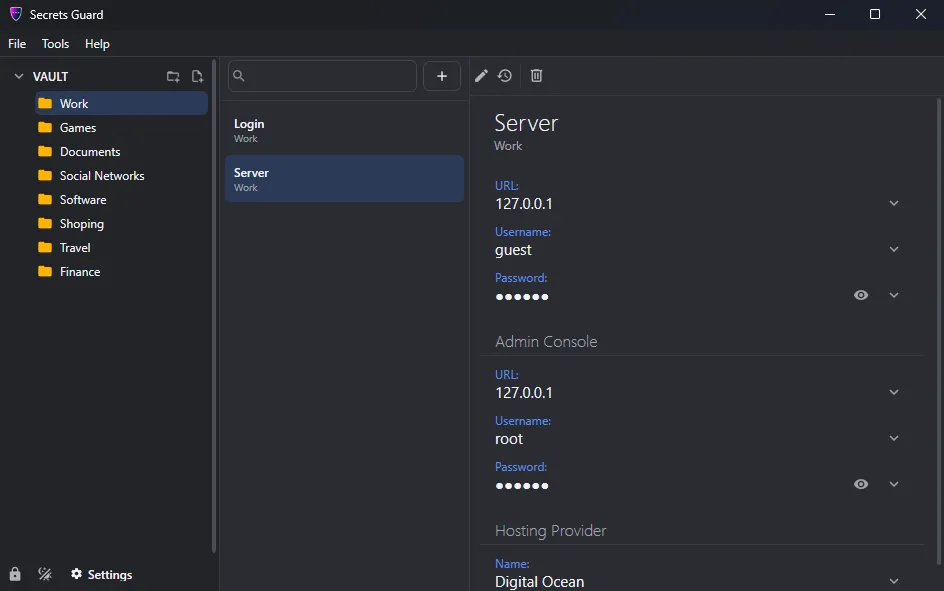
A credit card and a database connection have almost nothing in common, so Secrets Guard does not force them into the same form. Records are built from templates, and templates are yours to define: name one, lay out its sections, add the fields you need with the right type for each, and offer predefined choices where they help. The next record of that kind takes seconds.
Ready-made templates cover the usual suspects - site logins, bank accounts, cards, database connections and more - and every record can carry free-form notes and file attachments, which is where the scans and recovery codes finally have a home.
Still findable when there are four hundred of them
A vault is only useful if you can get to the entry you want faster than you could reset the password. Folders nest as deep as you like, the workspace is a resizable three-column layout - folders, records, details - and filtering by name narrows a long list as you type. Copying a field to the clipboard is one click, so nothing needs to be read off the screen and retyped.
And if you overwrite something by mistake
Editing a record keeps the earlier versions, each with its date. Step back and forth through them field by field to see what a value used to be - useful when a password was rotated and the old one turns out to still matter, or when you simply saved over the wrong thing. When you need a new password rather than an old one, the generator is right there: set the length, pick which character sets to include, regenerate until you like it, copy it out.
Light and dark themes are both built in, for whichever one your eyes prefer at the hour you are doing this.
Getting it
Version 3.0.0.24 runs on Windows 11 with .NET 10 and installs from a 4 MB package. The licence is a one-time purchase of $24.95 - no subscription for the privilege of reading your own passwords.
Download: Secrets Guard for Windows (installer)
Learn more: Secrets Guard product page