Every digital professional deals with tedious, repetitive tasks: before publishing a new build or delivering a project, you often need to purge temporary files, copy build artifacts, package them into a timestamped ZIP archive, update version tags in a config file, and execute a verification command.
Doing this manually is time-consuming and prone to human error. On the other hand, writing and maintaining custom PowerShell or Python scripts can feel like overkill for straightforward desktop tasks.
To solve this, we created Automator - a visual workflow builder designed specifically for Windows users who want to automate routine file system tasks and application executions without writing a single line of code.
Key Capabilities of Automator
1. Visual Workflow Builder
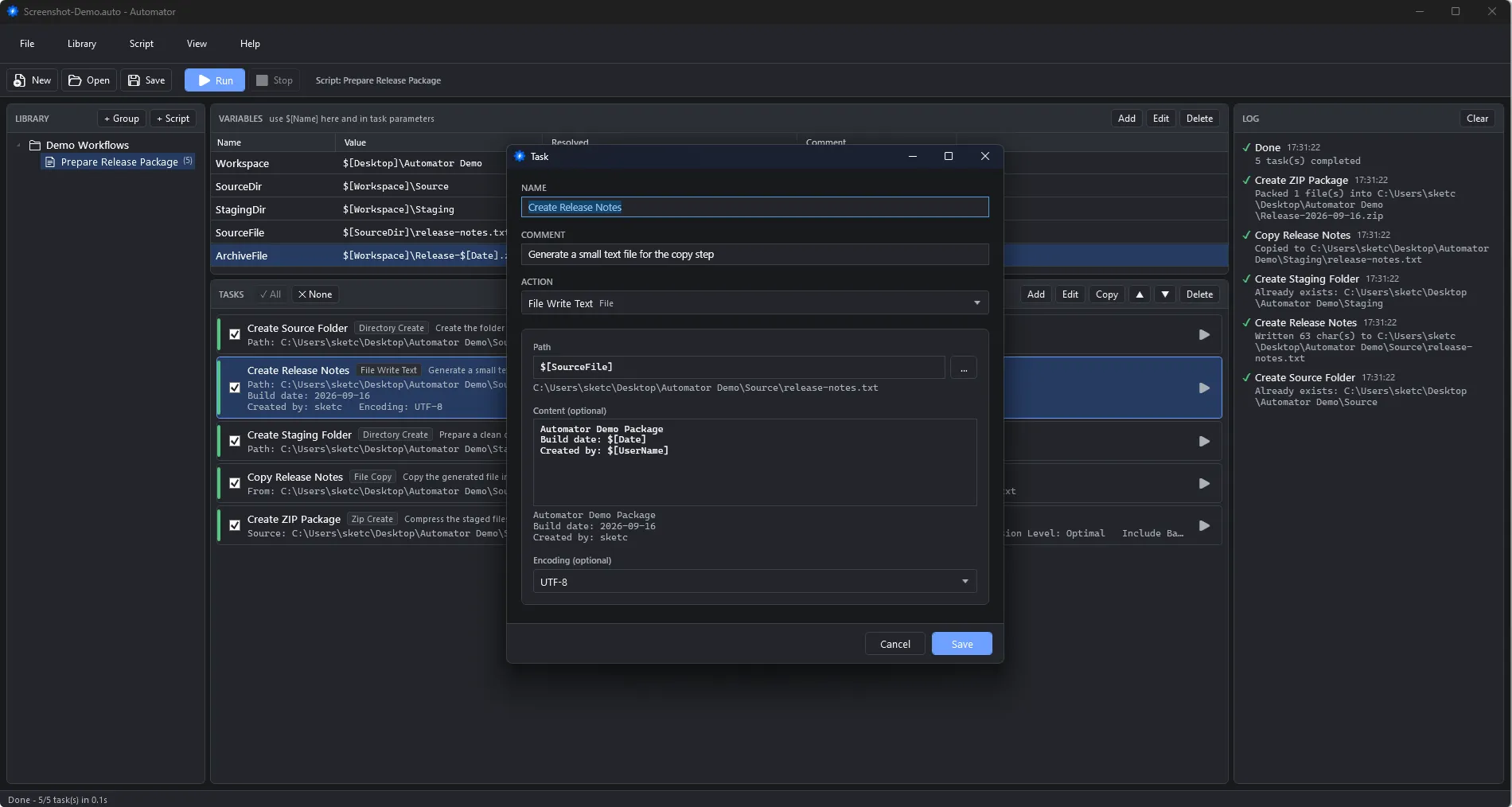
No more trying to remember a long sequence of manual steps. Assemble your process from intuitive, ready-made action blocks:
- Custom execution order: Organize actions from top to bottom, reorder via drag-and-drop, and duplicate steps in seconds.
- Granular control: Temporarily disable individual tasks without deleting them.
- Isolated testing: Run the entire workflow or execute only the selected task - making troubleshooting and iterative setup fast and stress-free.
2. Comprehensive File & Folder Management
- Create, copy, move, rename, and delete individual files or entire folder trees recursively. Required parent directories are automatically created when needed.
- Delete files by mask: Clean up working directories by targeting patterns (e.g., purge all
*.tmpor*.logfiles across nested directories).
3. Dynamic Variables Engine
Define values once and reuse them across paths, command arguments, and text blocks:
- Custom & nested variables: Define reusable values using the
$[Name]syntax. - Dynamic timestamps: Inject current date and time tokens into file and folder names automatically.
- System folders & environment values: Direct access to Windows system locations (Desktop, Documents, AppData, User Profile) and environment variables (
$[Env:NAME]). - Live resolution & validation: Preview resolved values instantly, with built-in detection for missing variables, duplicate definitions, and circular references before execution begins.
4. Text Processing & ZIP Archiving
- Text manipulation: Create new text files, append log entries, or perform string replacements (first match or all occurrences) with full encoding support (UTF-8, UTF-8 BOM, UTF-16, and ANSI).
- Archive creation & extraction: Package single files or entire folders into ZIP archives with configurable compression levels, or extract existing archives securely.
5. Seamless Tool & Application Integration
Bring your favorite command-line utilities and tools right into your automated workflows:
- Launch
.exeexecutables,.batfiles, or.cmdscripts with custom arguments and dedicated working directories. - Console output capture: Log standard output (
stdout) and error streams (stderr) directly in Automator’s log viewer. - Process tree control: Configure exit-code error handling. When execution is stopped (via the Stop button or
F6), Automator cleanly terminates the application and all of its spawned child processes.
6. Preflight Validation & Transparent Logging
- Preflight safety checks: Automator validates variable integrity, mandatory parameters, and action configurations before altering any files on disk.
- Detailed execution log: Track real-time progress, per-task completion statuses, timestamps, and open full command outputs in a dedicated inspector.
7. Portable Library & Modern UI
- Save your entire workflow library in a portable
.autofile - easy to back up, share with team members, or move to another workstation. - Native Windows file associations for
.autodocuments. - Clean, focused interface supporting Light, Dark, and System themes.
Popular Use Cases
- Release Packaging: Clean output folders, copy release binaries, update version strings, generate a timestamped ZIP archive, and launch a smoke-test script.
- Config Deployment: Clone a template configuration, replace environment variables or API endpoints, append service headers, and launch the target application.
- Workspace Maintenance: Sweep intermediate cache files, remove leftover logs by mask, and recreate clean directory structures.
100% Free & Offline-First
Automator is available completely free for both personal and commercial use:
- No licenses, sign-ups, or subscriptions required.
- Unrestricted functionality: No feature paywalls or watermarks.
- Offline-first privacy: Your data, files, and workflows remain 100% private and execute strictly on your local drive.
Download Automator for Windows
Eliminate repetitive desktop friction today and let Automator handle the routine!