Tracking Missed Questions
ProfExam Simulator keeps track of how you answer each question in an exam. It can use this to build sessions that include more of the questions you find difficult and fewer of the ones you already know. This article explains how it works and how to use it.
This feature is available starting with version 10.22.0.0.
How to turn it on
- Select an exam in your library and click Start New Session.
- In the session setup, enable Maximum number of questions and enter how many questions the session should have.
- Check Prioritize missed questions.
- Start the session.
Below the checkbox you can see how many questions of each kind the exam has: Missed, New and Known.
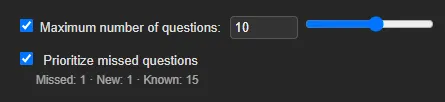
The app remembers this setting, so the checkbox will stay as you left it the next time you set up a session.
How questions are scored
Each question has a point score, just like in a quiz:
- a new question starts at 0;
- a correct answer gives the question +1;
- an incorrect answer (including a partially correct one) gives it −1;
- questions you skip without answering are not counted.
Points add up across all finished sessions of the exam, in any mode: exam, training or with answers shown. Retakes started from the results screen count too. Saved and unfinished sessions are not counted until you finish them.
Based on their points, questions fall into three groups:
| Points | Group | What it means |
|---|---|---|
| below 0 | Missed | you get this question wrong more often than right |
| 0 | New | a new question, or one you don't know reliably yet |
| above 0 | Known | a question you have learned; the more points, the more confident you are |
How a session is built
When the checkbox is checked, the app picks questions in two steps.
- Missed questions come first, starting with the hardest ones (those with the fewest points). They take up no more than half of the session, so it doesn't turn into nothing but mistakes.
- The remaining slots are filled at random, but weighted. Each positive point halves a question's chance of being picked:
Question points Chance of being picked 0 full +1 ½ +2 ¼ +3 or more ⅛ The chance stops dropping at +3. So well-learned questions never disappear completely: they come back from time to time to check that you haven't forgotten them.
Questions are picked from the set you chose in the session setup: the entire file, a single exam, selected sections or a question range. As before, the Randomize Questions option controls the order of the selected questions.
Why this is better than a simple list of mistakes
The usual approach is to mark the questions you got wrong and review only those. But such a list has drawbacks that a point score avoids:
- One random mistake doesn't make a question hard. If you answered a question correctly 15 times and slipped once, it has +14 points and still counts as known. In a simple list of mistakes it would sit next to questions you really don't know.
- A fixed mistake doesn't stay forever. Answer correctly a couple of times in a row and the points go positive, so the question makes room for the ones that are really hard.
- How hard a question is matters. A question at −5 is picked before one at −1.
- What you've learned isn't forgotten. Familiar questions come back now and then instead of dropping out of your practice for good.
The more often you practice, the more accurate it gets
Every finished session adds data for each question it included. After one or two attempts, almost all questions are still close to zero, and the selection is barely different from random. After a dozen attempts the app knows your weak spots well, and every new session targets them precisely.
That's why short, frequent sessions work best: for example, 30–50 questions every day rather than the whole exam once in a while.
FAQ
The Prioritize missed questions checkbox is disabled.
Enable Maximum number of questions. If the session includes every question, there is nothing to choose from, so the checkbox has no effect on which questions are included.
Right after updating, my missed questions are already there. How?
Points are calculated from your entire session history, including sessions taken before the update. That's why the feature works right away.
How do I start tracking from scratch?
Delete the exam's history with the Delete History button on its card. This also resets the question points; the app will warn you before deleting.
Why did I get a question I know well?
That's by design: known questions appear less often, but they never disappear completely, so the app can check that you haven't forgotten them.
Are skipped questions counted?
No. Skipping a question doesn't change its points in either direction.